Anonymous Verified Buyer
" Very responsive and helpful, competitive pricing. Good source! "
July 2025
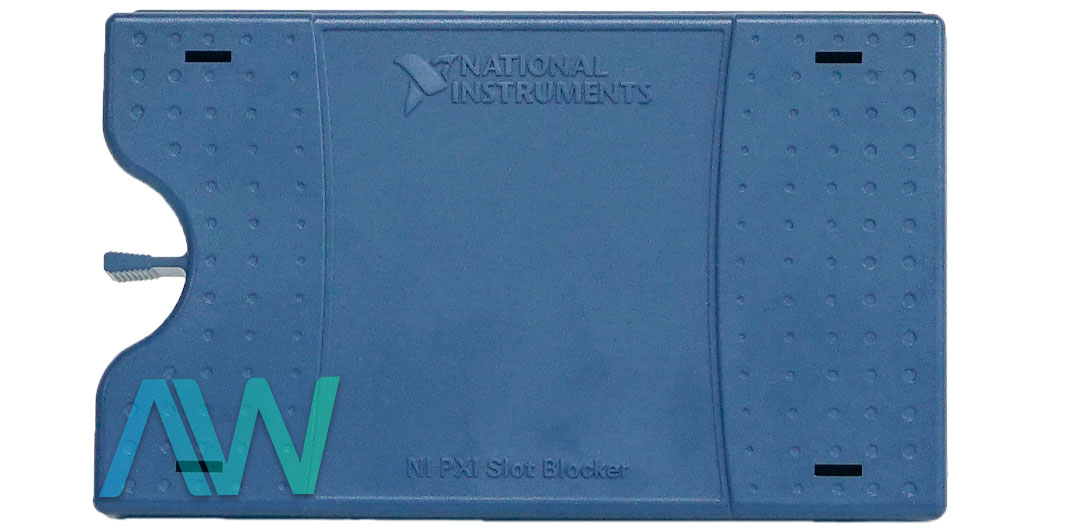
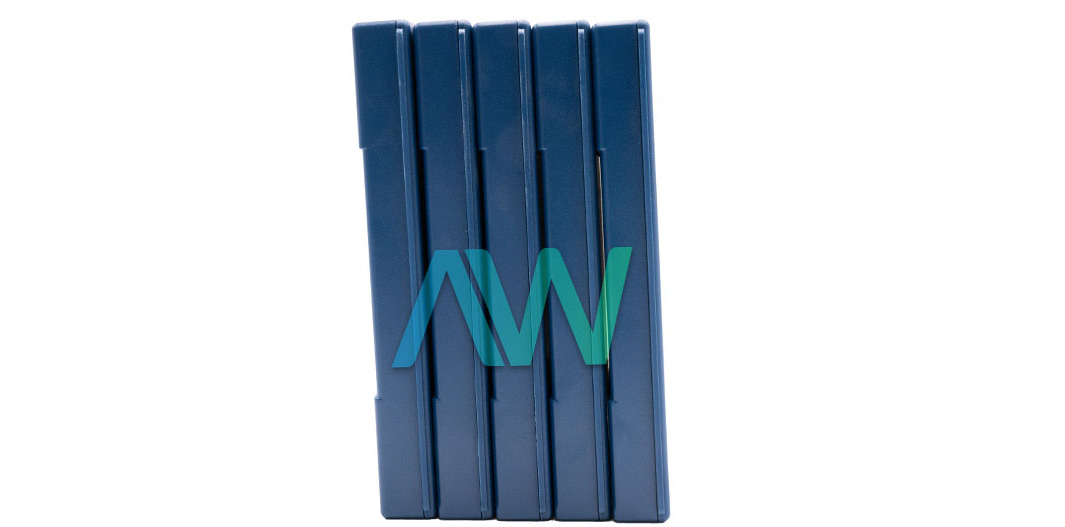
Part Number 199198-01, Set of 5, PXI Slot Blocker Kit
Actual item may vary if no part number is provided on quote request.



✔ 2 Year Warranty Included
✔ Free Domestic Ground Shipping
✔ NIST Calibration Available
Anonymous Verified Buyer
" Very responsive and helpful, competitive pricing. Good source! "
July 2025
Andrew Gar**** Verified Buyer
" Amazing to work with and had my order within 1 week after purchasing with all NI certs and data that were needed. "
March 2025
Said Sai**** Verified Buyer
" Competent contact for highly specialized components. The support team is very knowledgeable. Many thanks for the help and the fast shipping! "
January 2025
Bob C**** Verified Buyer
" Jason was able to get our emergency situation taken care of quickly and professionally. "
May 2025
Gregg Flecki**** Verified Buyer
" Great service and great products. This is my 2nd time using Apex Waves, truly impressed. "
January 2025

Carol Zimme**** Verified Buyer
" Very responsive and helpful, competitive pricing. Good source! "
July 2025
Andrew Gar**** Verified Buyer
" Amazing to work with and had my order within 1 week after purchasing with all NI certs and data that were needed. "
March 2025
Said Sai**** Verified Buyer
" Competent contact for highly specialized components. The support team is very knowledgeable. Many thanks for the help and the fast shipping! "
January 2025
Bob C**** Verified Buyer
" Jason was able to get our emergency situation taken care of quickly and professionally. "
May 2025
Gregg Flecki**** Verified Buyer
" Great service and great products. This is my 2nd time using Apex Waves, truly impressed. "
January 2025
National Instruments PXI Slot Blocker
The PXI Slot Blocker (Part number: 199198-01) (5 in kit) has been specifically designed to fill unused slots on compatible PXI and PXI Express chassis. By filling these slots the block helps to prevent airflow losses through the slots which can cause the operating temperature of the chassis to increase. This may affect the overall reliability of your PXI installation as it relates to power consumption and/or density. In addition to this function, the PXI Slot Blocker increases airflow throughout the chassis, and directs airflow around vacant slots to the slots containing installed PXI modules.
NI strongly recommends installing PXI Slot Blockers in conjunction with both standard and EMC filler panels when attempting to increase the cooling performance of specific PXI chassis . PXI Slot Blockers are highly suggested for use in all PXI chassis when the chassis fan is mounted at the back of the chassis. Such chassis are represented by the PXI-104x and PXIe-106x series, the PXIe-108x series (with exception being the PXIe-1083 and PXIe-1088), the PXIe-109x series (except for the PXIe-1090) and the PXIe-1075. They are also recommended for use in cases where the chassis fan is located beneath the card cage. The models of this type include all models in the PXI-103x family; all models in the PXIe-107x family, except for the PXIe-1075; the PXIe-1083, PXIe-1088, and PXIe-1090. The PXI Slot Blocker is not recommended for installation on any of the NI available options for PXI chassis having two stacked chassis configurations.
The following things are needed in order to effectively use the PXI Slot Blocker: a compatible PXI or PXI Express chassis, PXI Slot Blockers for the open slots, and PXI Filler Panels (sold separately). To use the PXI Slot Blockers, insert one into all of the empty slots of the PXI(e) chassis. A PXI Filler Panel should then be installed over the blocked slots in order to ensure adequate cooling for all of the modules.
By enhancing the PXI system's capacity to actively cool itself, the PXI Slot Blocker uses its engineered compatibility with the PXI and PXI Express configurations to increase the system's dependability and lifespan. The PXI Slot Blocker shifts air from open to filled slots while it is in operation. Applications requiring improved cooling should use the blocker.
| Model | PXI Slot Blocker |
|---|---|
| Manufacturer | National Instruments |
| Brand | Emerson |
| Part Number | 199198-01 |
| Type | PXI Slot Blocker Kit |
| Compatibility | PXI / PXIe Chassis |
| Function | Prevents airflow loss |
| Recommended For | PXI Chassis with Fans Located in the Rear or Below the Card Cage |
| Required Accessories | PXI Filler Panels (to Install Over all Slot Blockers) |
| # In Kit | 5 |
| Dimensions | For 4HP, 3U Slot Blocker: 0.7 in × 6.2 in × 3.7 in (18.2 mm × 157.5 mm × 94.9 mm) |
| PXI Slot Blocker Manual | Manual and PDFs Available for Download |
Associated part numbers for PXI Slot Blocker:
National Instruments PXI Slot Blocker Frequently Asked Questions
Question: How do I install PXI Filler Panels over the PXI Slot Blockers?
Answer: First, remove the captive screw covers (if any) from the filler panel. Then, secure the captive mounting screws to the chassis.
Question: Are there any special considerations when installing EMC Filler Panels?
Answer: When installing a EMC Filler Panel over a PXI Slot Blocker, make sure that the EMC gasket is located on the right side.
Question: What is the maximum torque that should be applied to the screws?
Answer: The maximum torque when installing panels over the PXI Slot Blocker is 2.5 in. · lb m to avoid overtightening.
Delivery:
Eligible returns may be accepted within 30 days at Apex Waves’ discretion. A 25% restocking fee applies; non-refundable and built-to-order products are excluded.
Payment:






Receive Price & Availability Today!
Ask About Our Tiered Calibration Levels
Option & Modules:
Confirm Your Requirements or Versions
Cost & Lead Time Available Upon Request for Service
Repair Evaluation: $150
Common Typos: