Anonymous Verified Buyer
" Very responsive and helpful, competitive pricing. Good source! "
July 2025
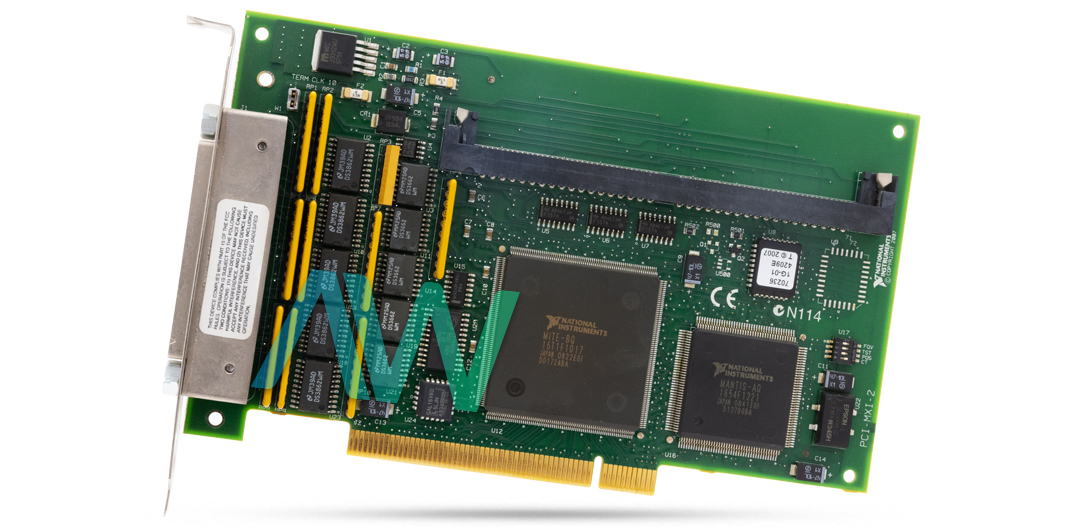
PCI-MXI-2, 1 PCI Slot, MXI-2 Series, Plug-in Circuit Board
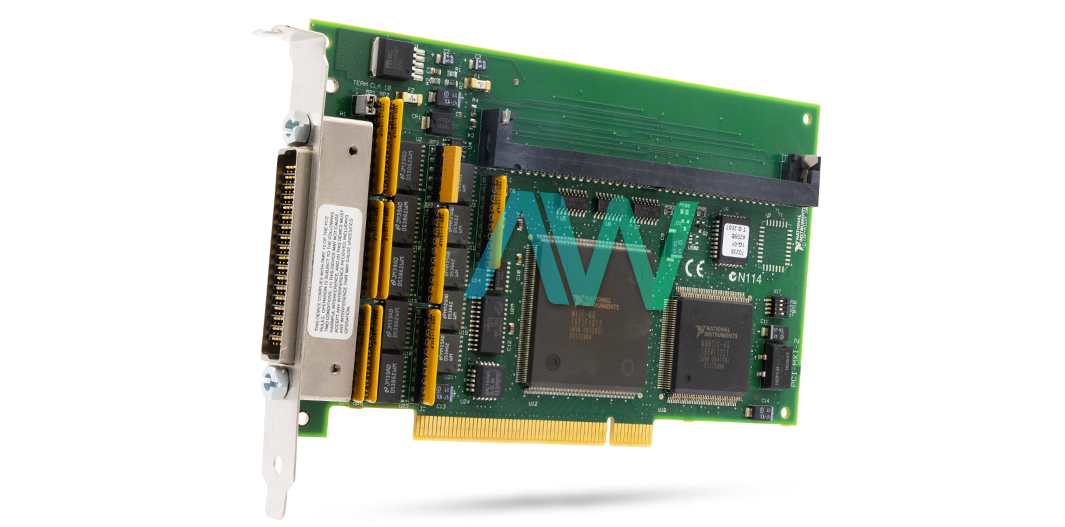
Actual item may vary if no part number is provided on quote request.


✔ 2 Year Warranty Included
✔ Free Domestic Ground Shipping
✔ NIST Calibration Available
Anonymous Verified Buyer
" Very responsive and helpful, competitive pricing. Good source! "
July 2025
Andrew Gar**** Verified Buyer
" Amazing to work with and had my order within 1 week after purchasing with all NI certs and data that were needed. "
March 2025
Said Sai**** Verified Buyer
" Competent contact for highly specialized components. The support team is very knowledgeable. Many thanks for the help and the fast shipping! "
January 2025
Bob C**** Verified Buyer
" Jason was able to get our emergency situation taken care of quickly and professionally. "
May 2025
Gregg Flecki**** Verified Buyer
" Great service and great products. This is my 2nd time using Apex Waves, truly impressed. "
January 2025

Carol Zimme**** Verified Buyer
" Very responsive and helpful, competitive pricing. Good source! "
July 2025
Andrew Gar**** Verified Buyer
" Amazing to work with and had my order within 1 week after purchasing with all NI certs and data that were needed. "
March 2025
Said Sai**** Verified Buyer
" Competent contact for highly specialized components. The support team is very knowledgeable. Many thanks for the help and the fast shipping! "
January 2025
Bob C**** Verified Buyer
" Jason was able to get our emergency situation taken care of quickly and professionally. "
May 2025
Gregg Flecki**** Verified Buyer
" Great service and great products. This is my 2nd time using Apex Waves, truly impressed. "
January 2025
National Instruments PCI-MXI-2 Plug-in Circuit Board
The NI PCI-MXI-2 (Part Number: 777185-01, 182685K-01) is part of the MXI-2 Series by National Instruments. This circuit board can be inserted into an expansion slot on the user’s PCI-based computer. The PCI-MXI-2 connects the user’s PCI-based computer straight to the MXI bus and the other way around. Since the PCI-MXI-2 utilizes an identical communication register set to other VXIbus message-based instruments, other MXIbus instruments see the PCI-MXI-2 as a VXIbus instrument. This plug-in circuit board supports D64, block, and synchronous MXI cycles for high-performance information transfer, supports MXI bus termination, and conforms to both PCI specification 2.1 and MXI bus specification 2.0. The device has a programmable memory space of 32 kb minimum, with a data path of 32 bits.
The NI PCI-MXI-2 Plug-In Circuit Board has an onboard EEPROM, which saves default register values that load when the model powers on. The EEPROM has two sections: a factory-configuration section and a user-configuration section. The factory-configured part of the model saves a back-up of the default user settings, while the user-configured part can be altered. The factory configuration is a minimal configuration, which enables the user to boot the PCI-MXI-2 despite modifications to the user configuration. When changing settings, do not modify the settings of switches 3 and 4 of U17.
The PCI-MXI-2 operates using the NI-VXI/NI-VISA software and is compatible with software packages like LabVIEW, LabWindows/CVI, and Measurement Studio. The device can be configured using the Measurement & Automation Explorer (MAX) tool.
For the MXIbus, the foremost and final instruments in the daisy chain must have a termination network. The PCI-MXI-2 circuit board can terminate the MXIbus signals on the interface board with terminating resistor networks in single inline packages. However, the foremost and final instruments in the daisy chain are the instruments that should be terminated. The instrument has a weight of 0.4 lbs. with the board dimensions: 6.875 x 4.2 in.
The PCI-MXI-2 operates using the NI-VXI/NI-VISA bus interface software in conjunction with application development environments (ADEs) such as LabVIEW, LabWindows/CVI, and Measurement Studio. The device software can be configured using the Measurement & Automation Explorer (MAX) tool.
The status of the PCI-MXI-2 is considered obsolete by National Instruments, but the plug-in circuit board will remain available for purchase and repairs with Apex Waves in perpetuity!
| Model | PCI-MXI-2 |
|---|---|
| Manufacturer | National Instruments |
| Brand | Emerson |
| Part Number | 777185-01, 182685K-01 |
| HTS Code | 8471801000 |
| Series | MXI-2 Series |
| Type | Plug-In Circuit Board |
| Memory Space | 32 KB Minimum, Programmable |
| Data Path | 32 Bits |
| Board Dimensions | 6.875 by 4.2 in. |
| Weight | 0.4 lb. without DRAM Installed |
| PCI-MXI-2 Manual | User Manual and Maintenance Manual Available for Download |
| Price | Request a Quote |
Associated part numbers for PCI-MXI-2:
National Instruments PCI-MXI-2 Frequently Asked Questions
Question: What size DRAM can be installed on the PCI-MXI-2?
Answer: A maximum DRAM of 16 MB can be installed.
Question: What software tool should I use to configure the PCI-MXI-2?
Answer: You should use the Measurement & Automation Explorer (MAX) utility to view and configure the settings for the PCI-MXI-2.
Question: Does the PCI-MXI-2 require the older VXIinit utility to initialize the hardware?
Answer: No, you no longer need to run VXIinit because the hardware settings are automatically loaded into the drive.
Question: Can the PCI-MXI-2 act as the MXIbus System Controller?
Answer: Yes, it can function as the MXIbus System Controller, and by default, it will automatically detect whether it should take on this role based on how the cables are connected.
Question: If my system has VME devices, how do I configure them to work with the PCI-MXI-2?
Answer: Because VME devices cannot be automatically detected, you must manually enter their information into the MAX utility using the Create New wizard so the system can properly allocate resources
ARCHIVED--GETTING-STARTED-WITH-LABWINDOWS-CVI.PDF
ARCHIVED--GETTING-STARTED-WITH-YOUR-PC-BASED-MXI-2-INTERFACE-FOR-WINDOWS.PDF
ARCHIVED--GETTING-STARTED-WITH-YOUR-PCI-BASED-MXI-2-INTERFACE-FOR-WINDOWS-2000-NT-ME-98.PDF
ARCHIVED--GETTING-STARTED-WITH-YOUR-PCI-MXI-2-AND-THE-NI-VXI-NI-VISA-SOFTWARE-FOR-LINUX.PDF
ARCHIVED--GETTING-STARTED-WITH-YOUR-VXI-1394-INTERFACE-FOR-WINDOWS-NT-98-AND-SPECIFICATIONS.PDF
ARCHIVED--GETTING-STARTED-WITH-YOUR-VXI-VME-PCI8020-AND-THE-NI-VXI-SOFTWARE-FOR-SOLARIS.PDF
ARCHIVED--GETTING-STARTED-WITH-YOUR-VXI-VME-PCI8022-AND-THE-NI-VXI-SOFTWARE-FOR-SOLARIS.PDF
ARCHIVED--GETTING-STARTED-WITH-YOUR-VXI-VME-PCI8026-AND-THE-NI-VXI-NI-VISA-SOFTWARE-FOR-LINUX.PDF
ARCHIVED--GETTING-STARTED-WITH-YOUR-VXI-VME-PCI8040-AND-THE-NI-VXI-SOFTWARE-FOR-MACINTOSH.PDF
ARCHIVED--LABVIEW-VXI-VI-REFERENCE-MANUAL.PDF
ARCHIVED--MXI-2-CONFIGURATION-REFERENCE-MANUAL-AND-SPECIFICATIONS.PDF
ARCHIVED--NI-VXI-FOR-NB-MXI-FOR-MACINTOSH-AND-POWER-MACINTOSH-RELEASE-NOTES.PDF
ARCHIVED--NI-VXI-GRAPHICAL-UTILITIES-REFERENCE-MANUAL.PDF
ARCHIVED--NI-VXI-NI-VISA-FOR-THE-PCI-MXI-2-FOR-LINUX-INSTALLATION-GUIDE.PDF
Delivery:
Eligible returns may be accepted within 30 days at Apex Waves’ discretion. A 25% restocking fee applies; non-refundable and built-to-order products are excluded.
Payment:






Receive Price & Availability Today!
Ask About Our Tiered Calibration Levels
Option & Modules:
Confirm Your Requirements or Versions
Cost & Lead Time Available Upon Request for Service
Repair Evaluation: $150
Common Typos: