


Setup and Optimize the National Instruments PXI-5441 Waveform Generator
Listen to this blog post here. The National Instruments PXI-5441 is a powerful PXI waveform generator designed...
October 25, 2024
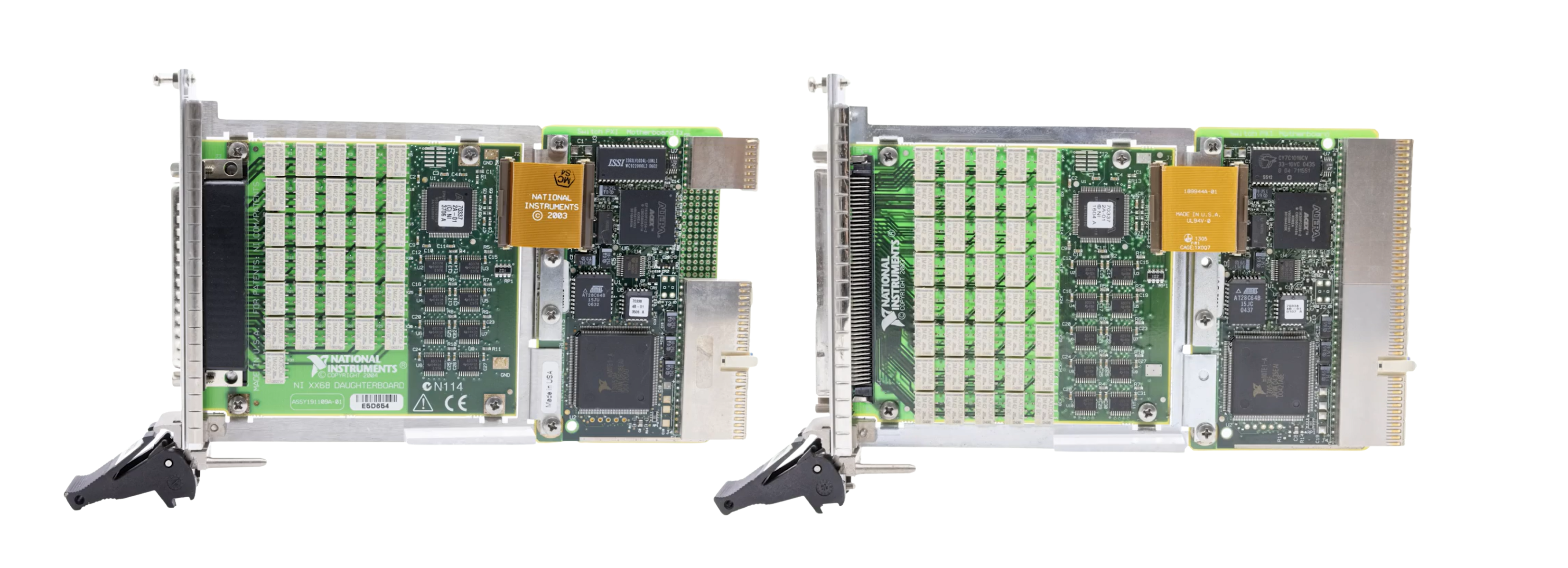






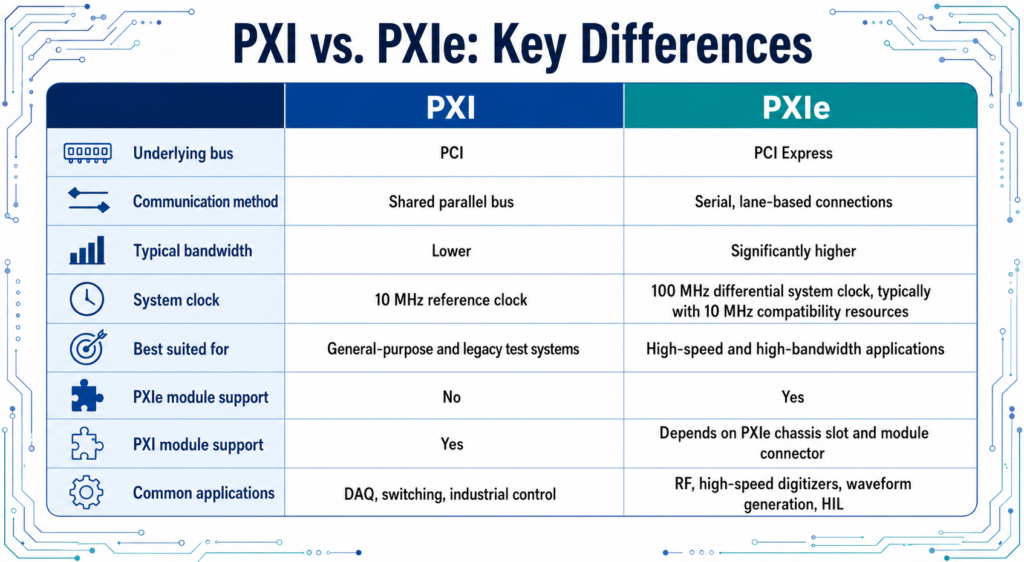
The modular PXI and PXIe platforms are well known for adapting to meet the diverse needs of test and measurement applications. While these platforms are closely related, they are not universally interchangeable. In this post, we will take a deep dive into both the similarities and the distinctions of these platforms to see how they impact their operation.
PXI stands for PCI Extensions for Instrumentation. It expands upon the well-known PCI (Peripheral Component Interconnect) bus standard, which is a fundamental component of many computers. As a result, PXI sets up a flexible framework for developing custom measurement and automation systems.
When compared to earlier platforms, PXI offers greater integration, modularity, and flexibility, making it an excellent choice for a range of applications. Its high-performance capabilities and modular design make it a widely used platform for data acquisition systems and industrial control systems. The modules hosted by a PXI chassis are controlled by external or embedded controllers.
PXIe stands for PCI eXtensions for Instrumentation Express (or simply PXI Express). Introduced in 2005, this platform utilizes the PCIe bus architecture. When compared to the previous PCI bus, PCIe delivers significantly faster data transfer speeds, which results in improved performance. The PXIe platform uses PCIe communication to create an extension of the PXI platform, excelling in demanding high-speed and high-bandwidth applications such as digital communication, RF, and microwave testing.
In order to provide greater choice in module selection, PXIe chassis can include hybrid slots that accommodate both PXIe and PXI modules.
1992: The PCI Bus is Introduced
In the early 1990s, it was difficult to connect many peripherals to a CPU because PCs had a large variety of Input/Output (I/O) busses, such as VESA, ISA, and EISA. The PCI bus was developed to address this issue, quickly gaining popularity as a chip-to-chip interface.
1995: Creation of CompactPCI
CompactPCI was first created to adapt the PCI Bus for rugged/modular systems by integrating PCI signaling and protocols with a Eurocard-style connector (which is an IEEE-approved structure for printed circuit boards that enables safe insertion into a standard frame). Throughout the years, CompactPCI has expanded to support more sophisticated technologies.
1998: Release of the PXI Platform
The PXI platform was first introduced by NI (then National Instruments) as a PC-based solution that integrated CompactPCI’s modular design with the PCI bus infrastructure. It quickly became a popular platform due to its modular design and ability to drastically cut down on device integration time. Even today, the PXI platform is widely used, as a powerful and affordable solution for automation and measurement systems in the automotive, industrial, and aerospace fields. PXI is an open specification, overseen by the PXISA (PXI Systems Alliance).
2003: Improvements of the PCI Express Bus
The PCI Express (PCIe) system was introduced to improve on the original PCI bus by replacing the shared parallel bus with a point-to-point bus topology. As a result, each device has point-to-point serial links that are connected via switches. While the PCI bus divides the bandwidth among all the devices on the bus, the PCIe bus uses differential signaling pairs to allow devices to communicate via “lanes”.
2005: The New PXI Standard: PXI Express (PXIe)
PXI Express (PXIe) was released as a new standard for the PXI platform in 2005. By using the PCIe bus, this platform now offered a dramatically higher bus bandwidth, from 132 MB/s to 6 GB/s. The system controller slot for PXIe supports up to x16 PCIe links. The backwards compatibility with PXI allows access to a wide range of applications that were previously limited.
Compatibility between PXI and PXIe modules depends on a variety of factors, including the type of chassis and slot, the module connector, the bandwidth of the backplane, the power/cooling specifications, the timing/synchronization, and operating system (OS) support.
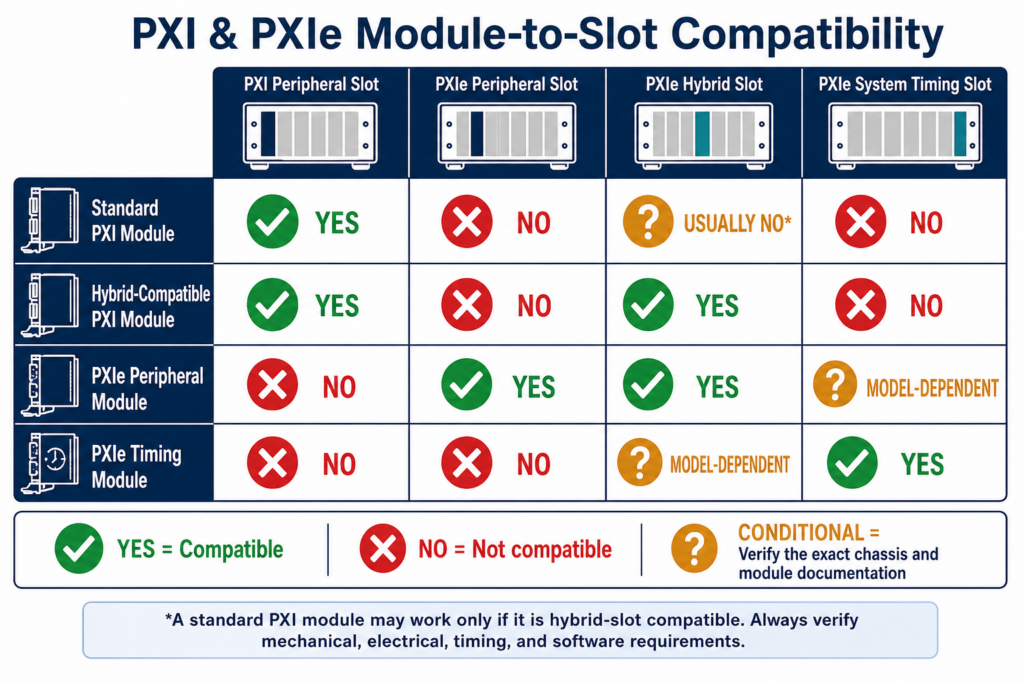
While the chart above offers general compatibility guidance, it is important to always verify the specifications of your chassis and modules with their official documentation/manuals, as there may be some additional requirements.
System Controller Slots
In a standard chassis, the system controller slot is designated as Slot 1 (the leftmost slot) of a chassis. Many chassis offer controller-expansion options to the left of Slot 1 for an embedded controller that is broader than a single slot. The width and expansion space for the chassis should be verified in the user manual. These controllers are either embedded or use a remote-control interface.
Embedded controllers offer dependable performance as a self-contained computer that is installed directly into the chassis. Remote controllers utilize connections such as PCIe/MXI over copper or fiber (or Thunderbolt on supported hardware) to link a chassis to an external host computer (laptop, workstation, or desktop). This allows for a versatile arrangement.
Peripheral Slots
There are hundreds of different types of peripheral modules from NI, designed for data acquisition, control, instrumentation, interfacing, and more. Because PXI is an open industry standard, additional compatible modules are also available from third parties.
Peripheral slots on a PXI chassis accept PXI peripheral modules but not PXIe peripheral modules. The peripheral slots on a PXIe chassis do accept PXIe peripheral modules, but do not automatically accept traditional PXI modules. PXI chassis peripheral slots use PCI signaling, while PXIe slots use PCIe signaling.
Hybrid Peripheral Slots
Certain PXIe chassis are equipped with hybrid peripheral slots, which are designed to support both PXIe modules and PXI modules that are hybrid-slot compatible.
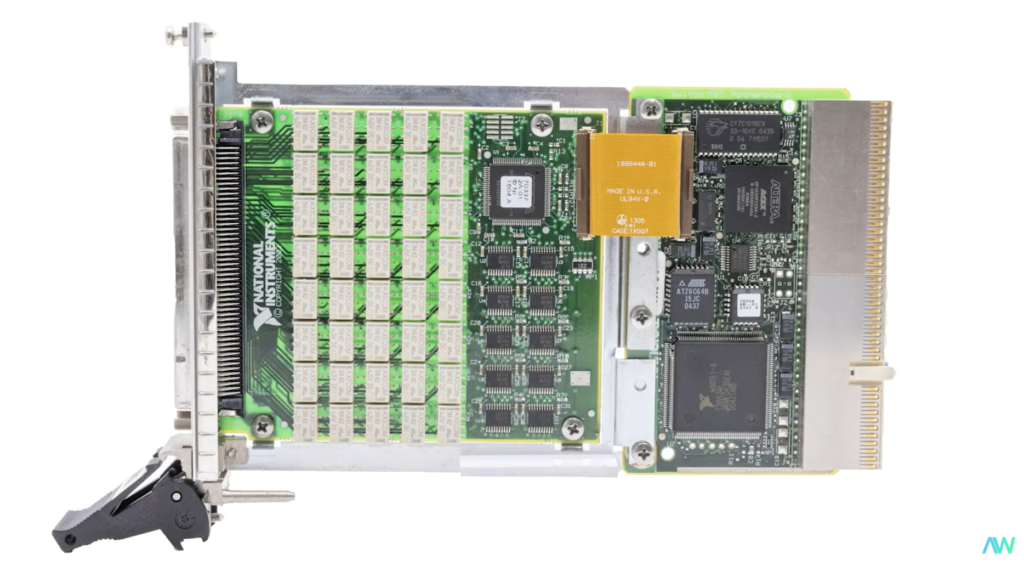
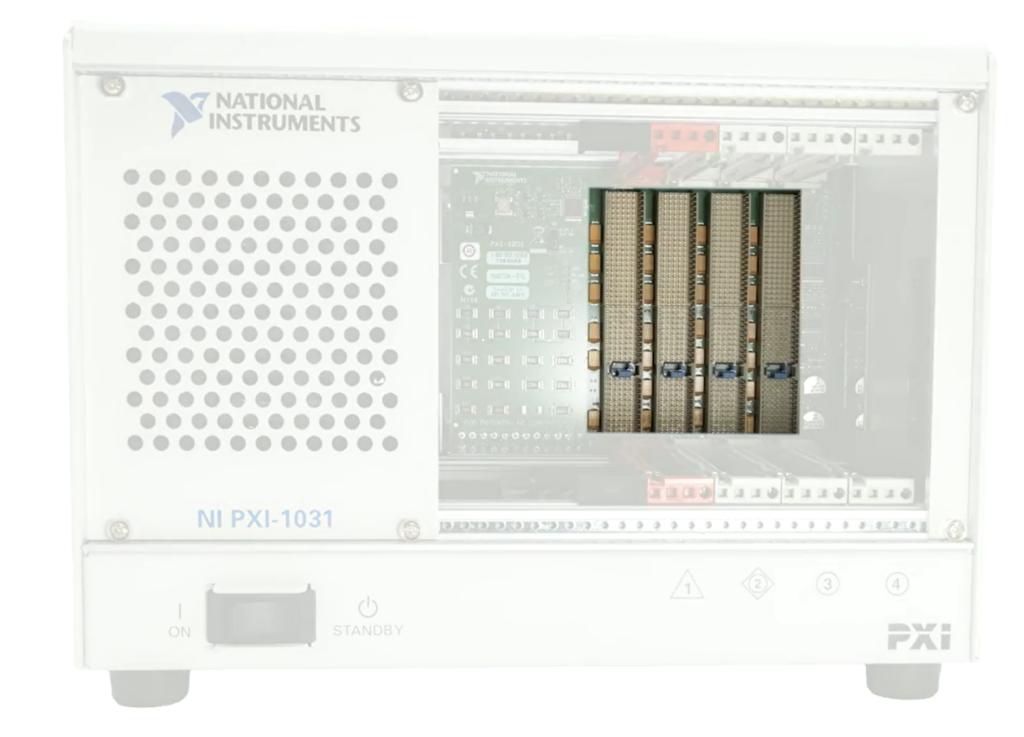
Listed above: a standard PXI module connector alongside standard PXI chassis backplane connections.
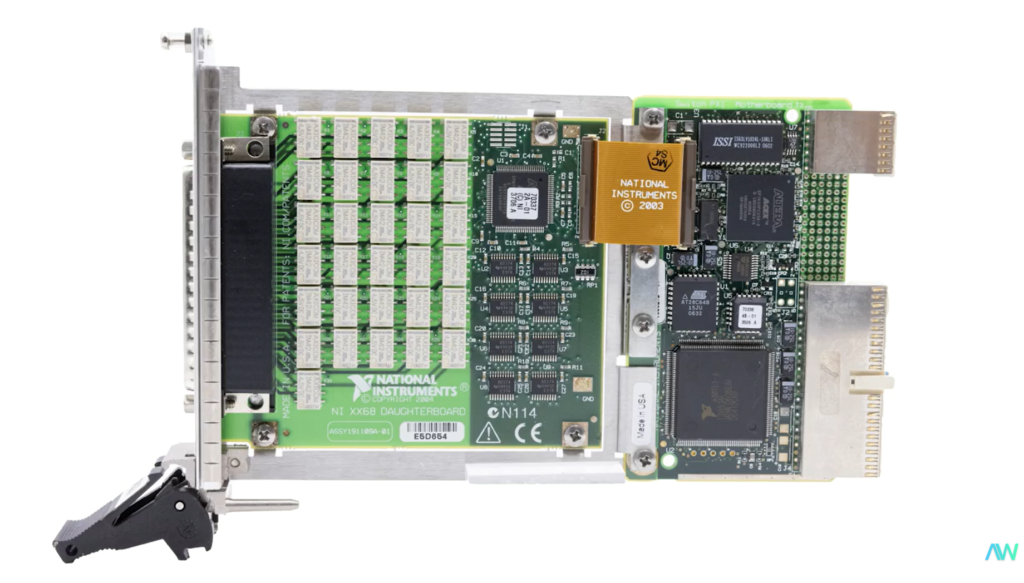
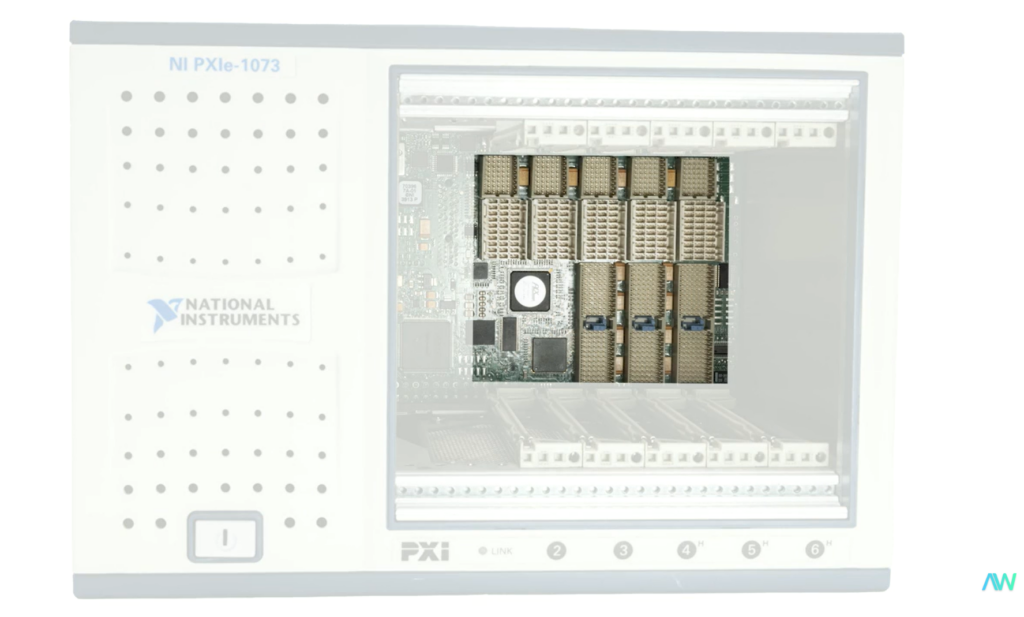
Listed above: a hybrid connector on a module as well as hybrid PXIe chassis backplane connections.
In general, a PXI module can fit into a PXIe chassis slot only if the chassis has a traditional PXI peripheral slot, or if the PXI module is hybrid compatible and there is a hybrid peripheral slot.
System Timing Slots
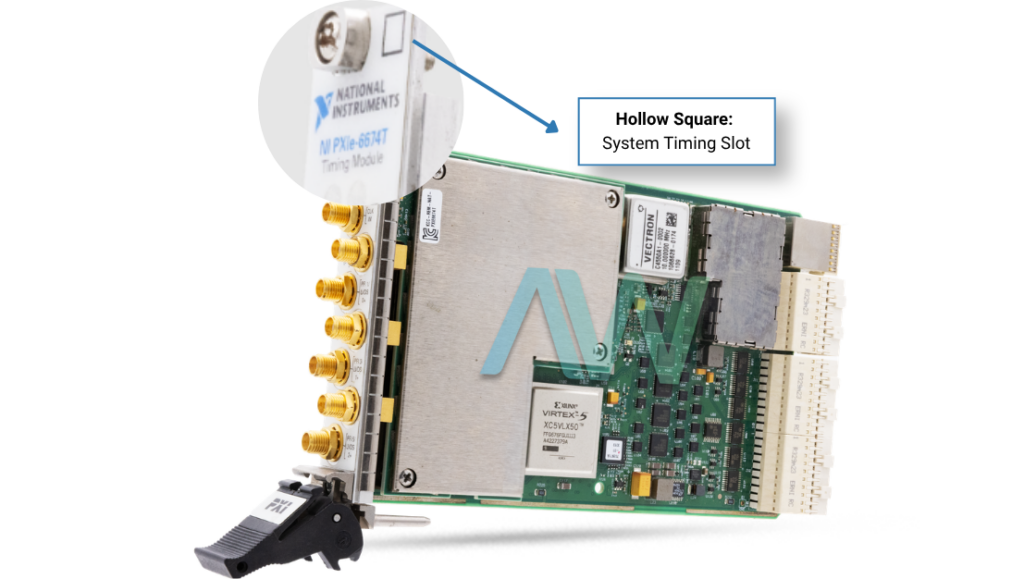
System timing slots in PXIe chassis are specifically designed to support timing and synchronization modules, though some may also support PXIe peripheral modules.
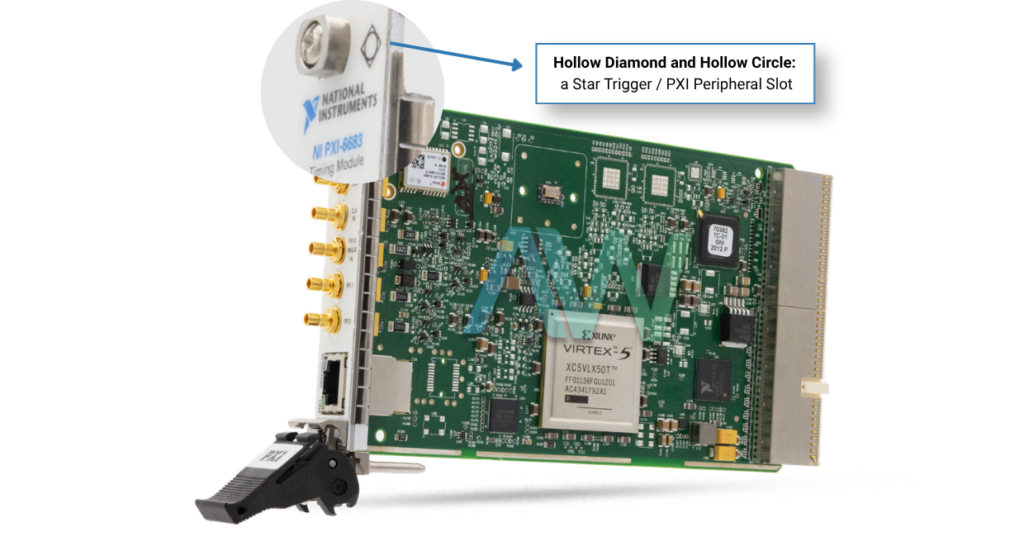
The small symbols located beneath the slots of a PXI(e) chassis correspond with symbols found on PXI(e) modules to indicate compatibility. When symbols are combined, such as the hollow diamond and hollow circle labeled below, it indicates that both card types are compatible with the slot.
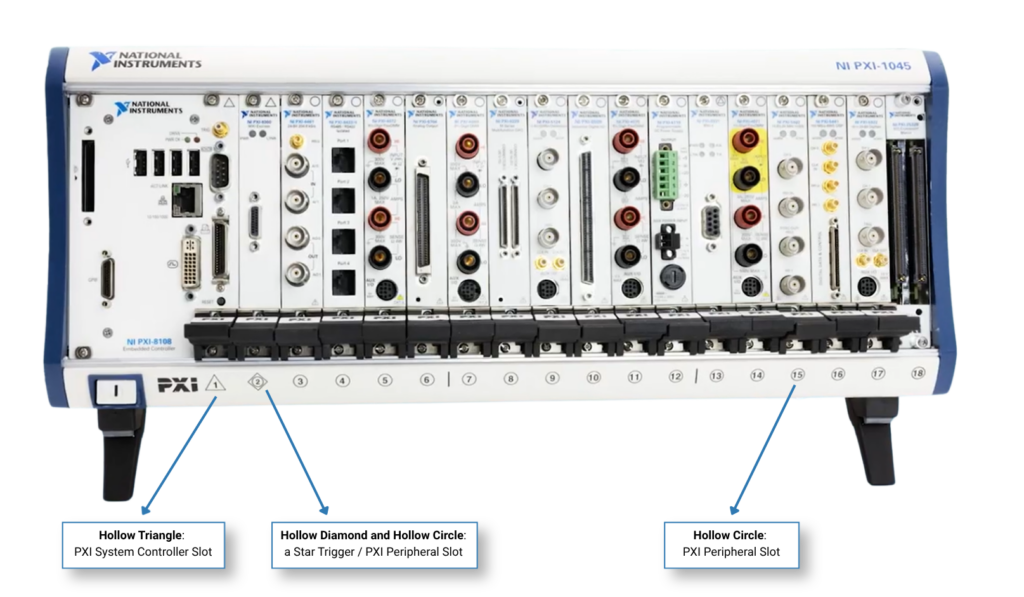
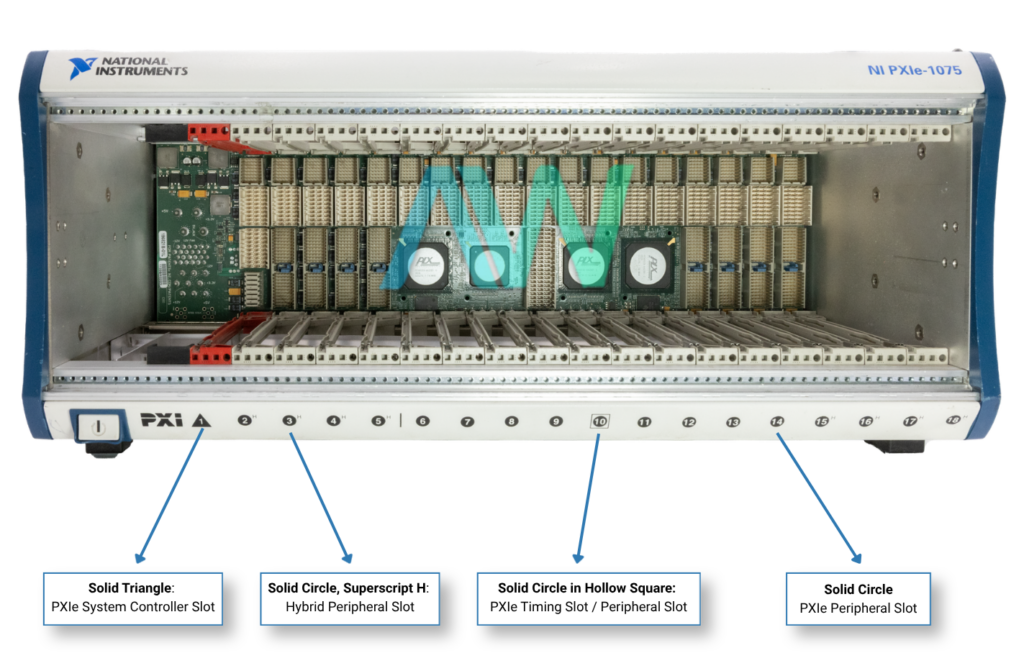
Not shown in the labeled PXI and PXIe chassis above are the solo hollow square and hollow diamond symbols, which indicate a system timing slot and a star trigger slot respectively.
Even if they have similar dimensions, PXIe modules cannot be installed into a traditional PXI chassis because they do not provide the PCIe signaling or physical backplane connectors that are required.
Though a PXI or PXIe module may be physically compatible with a chassis slot, there are still some additional technical specifications to consider. These include:
Backplane bandwidth: the per-slot bandwidth and total system bandwidth may differ.
Power requirements: physical compatibility between the module and the chassis does not always guarantee that it will have sufficient power. Like bandwidth, the chassis power can vary with different per-slot power and total power.
Cooling capacity: reference the official manufacturer documentation to compare the cooling requirement of the module with the per-slot cooling rating of the chassis. Valuable information to know about the cooling capacity of the chassis is the fan mode, airflow direction, and rack clearance.
Timing and Synchronization requirements: PXI backplanes use a single-ended reference clock (PXI_CLK10) while PXIe backplanes add on a additional differential system clock (PXIe_CLK100).
PXI hardware is driven by software, so identifying the specific software specifications you need is important when determining compatibility. Based on the requirements for your application, you will want to determine the operating system that will be used as well as which NI driver versions are recommended. Languages such as C/C++, LabVIEW (32-bit or 64-bit), or Python can be used to create measurement and analysis programs that are specific to your needs.
The Apex Waves PXI System Configurator offers legacy hardware options. With the help of this comprehensive and user-friendly tool, you can build out the chassis, controller, modules, and software for your PXI(e) system and identify any compatibility issues prior to purchasing.
Learn more information about our PXI System Configurator in our previous blog post!
A monthly email packed with valuable content—industry news, tutorials, obsolescence updates, and more. No sales pitches, just insights we think you'll find helpful!
Listen to this blog post here. The National Instruments PXI-5441 is a powerful PXI waveform generator designed...
Click here to listen to this post. Companies in almost every industry are being transformed...
Listen to this post here. The PXIe Platform from National Instruments offers an incredibly valuable toolset for...

Click here to listen to this post instead. It is no secret that simulation and...