


Setup and Optimize the National Instruments PXI-5441 Waveform Generator
Listen to this blog post here. The National Instruments PXI-5441 is a powerful PXI waveform generator designed...
October 25, 2024







The NI Community Discussion Forum is a valuable resource for engineers and enthusiasts of all experience levels. In today’s post, we’re shining a spotlight on one of our favorite NI Forum finds—simulating and solving a Rubik’s Cube using LabVIEW! Let’s take a look at how NI’s popular software can act as a simulation engine to solve this classic 3D puzzle.
QUICK INSIGHTS:
Ready to try this project yourself? All necessary files are linked at the bottom of this post!
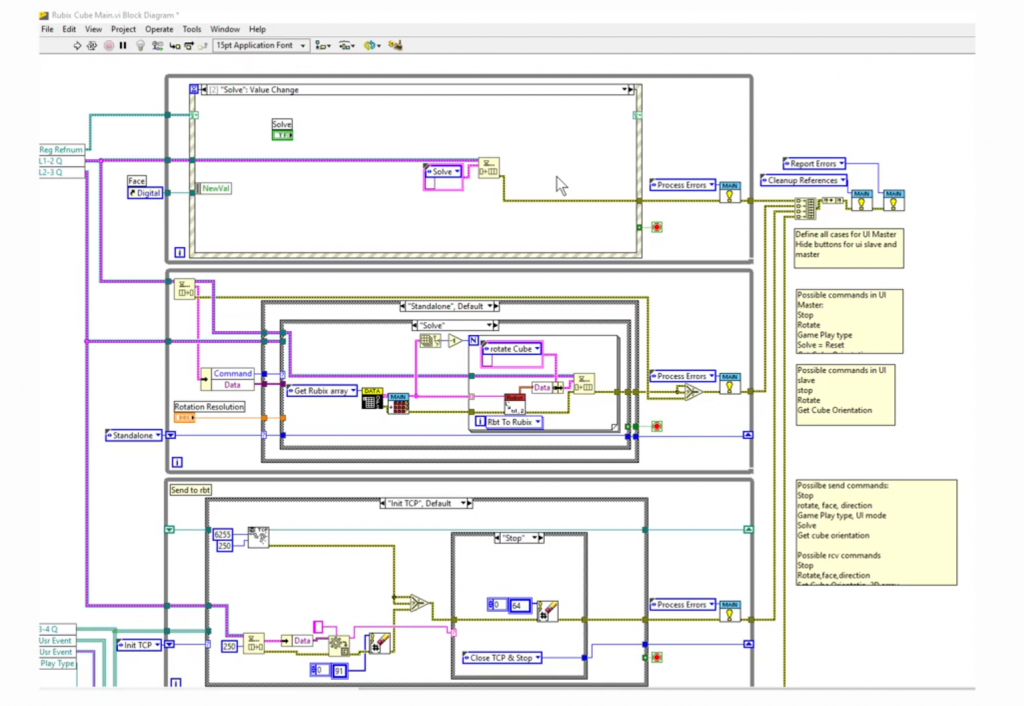
This project creates a fully interactive Rubik’s Cube simulation that can be rotated, scrambled, and solved using built-in algorithms. The front panel of the 3D cube utilizes custom-drawn graphics built using LabVIEW controls and indicators, serving as the user interface of the simulation. The user can randomly scramble the cube, select the face buttons to simulate manual rotations, or choose to solve the puzzle with a simple click of a button.

The block diagram accomplishes these operations by running a set of functions that mimic the logic of well-known cube-solving methods, such as the “beginner’s method” or “layer-by-layer” solving. Each face of the cube is a 3×3 matrix. For each rotation, the logic is handled using matrix transformations and array shift operations. Each color on the Rubik’s Cube is tracked by an index system—when the user rotates any of the faces, LabVIEW updates both the array of that specific face as well as the adjacent edge strips of the connected sides. These mechanics apply whether the rotation is done manually or as part of the “solve” algorithm.

The block diagram utilizes case structures in order to interpret which face is being rotated and the direction it is being moved in. A LabVIEW case structure is comprised of subdiagrams, also called “cases”. The case that is run at runtime is determined by a selector value. In order to handle undefined values, the structure must have a “default case” or exactly one subdiagram for every possible value of the associated data type. In this way, the Rubik’s Cube code accounts for all 18 (6 faces × 3 types of rotations) possible moves.

The solve function of the cube is built using a simplified layer-by-layer approach—it solves the white cross first, followed by the corners, the middle edges, the yellow face, and so on. At each stage, embedded logic detects patterns to decide which rotations should be applied next.
While this LabVIEW simulation is not quite as fast as some other solving applications, such as Kociemba’s optimal solver, it is impressively accurate. There is even an option to go through the solution step-by-step, helping the user to learn exactly how to solve the puzzle on their own.
What makes this project so compelling? Not only is it a creative way to showcase logic and array manipulation, but it is also purely LabVIEW logic. It combines pattern recognition, matrix transformation, and algorithmic sequencing—all visualized in a clean, interactive UI. It’s a great example of how LabVIEW isn’t just for data acquisition; it can be a tool for simulation, algorithmic development, and even fun visual logic puzzles like this.
If you are using LabVIEW in an academic setting, this is an excellent tool to demonstrate the fundamentals of programming by using a well-known real-world puzzle. By providing both students and developers with a familiar and interactive tool to work with, this project makes learning programming with LabVIEW even more approachable. If LabVIEW can model, manipulate, and solve a Rubik’s Cube, it can definitely handle all of the logic needs for your automated test setup!
We are always inspired by the creativity of the NI community, seeing the innovative ways that users push the boundaries of NI tools. This Rubik’s Cube solver project is a great reminder that sometimes, the most interesting solutions often come from thinking outside the “cube”.
Whether you are designing puzzle solving simulations or working with mission-critical test challenges, Apex Waves is here to support you with the hardware and insight you need. In addition to our diverse inventory with thousands of fully tested NI modules in stock and ready to ship, we offer support services to help you with repairs or calibration. Need help putting your entire system together? Check out our PXI system collaborator!
Ready to try out this LabVIEW project yourself? The VI files and Course Code can be found on the NI Forum, linked below. If you run into any issues or have any questions about LabVIEW, feel free to reach out to us directly by emailing support@apexwaves.com. Special thanks to NI user KRivera for sharing this project!
A monthly email packed with valuable content—industry news, tutorials, obsolescence updates, and more. No sales pitches, just insights we think you'll find helpful!
Listen to this blog post here. The National Instruments PXI-5441 is a powerful PXI waveform generator designed...
Click here to listen to this post. Companies in almost every industry are being transformed...
Listen to this post here. The PXIe Platform from National Instruments offers an incredibly valuable toolset for...

Click here to listen to this post instead. It is no secret that simulation and...